Quick Verdict
Fly33 Game is an Android application distributed as an APK for users in Pakistan who want access to Aviator crash, sports betting, and a multi-category game library from a single mobile interface. Searching for Fly33 typically means users want to find a working APK, understand what the platform actually offers in practice, and assess whether it suits their device before committing to the download.
This review focuses on practical observations from hands-on testing rather than promotional descriptions. It covers what the installation process looks like, how the interface behaves after the first launch, how deposits work with JazzCash and EasyPaisa, what the referral system offers, and what device and network requirements users should realistically plan for.
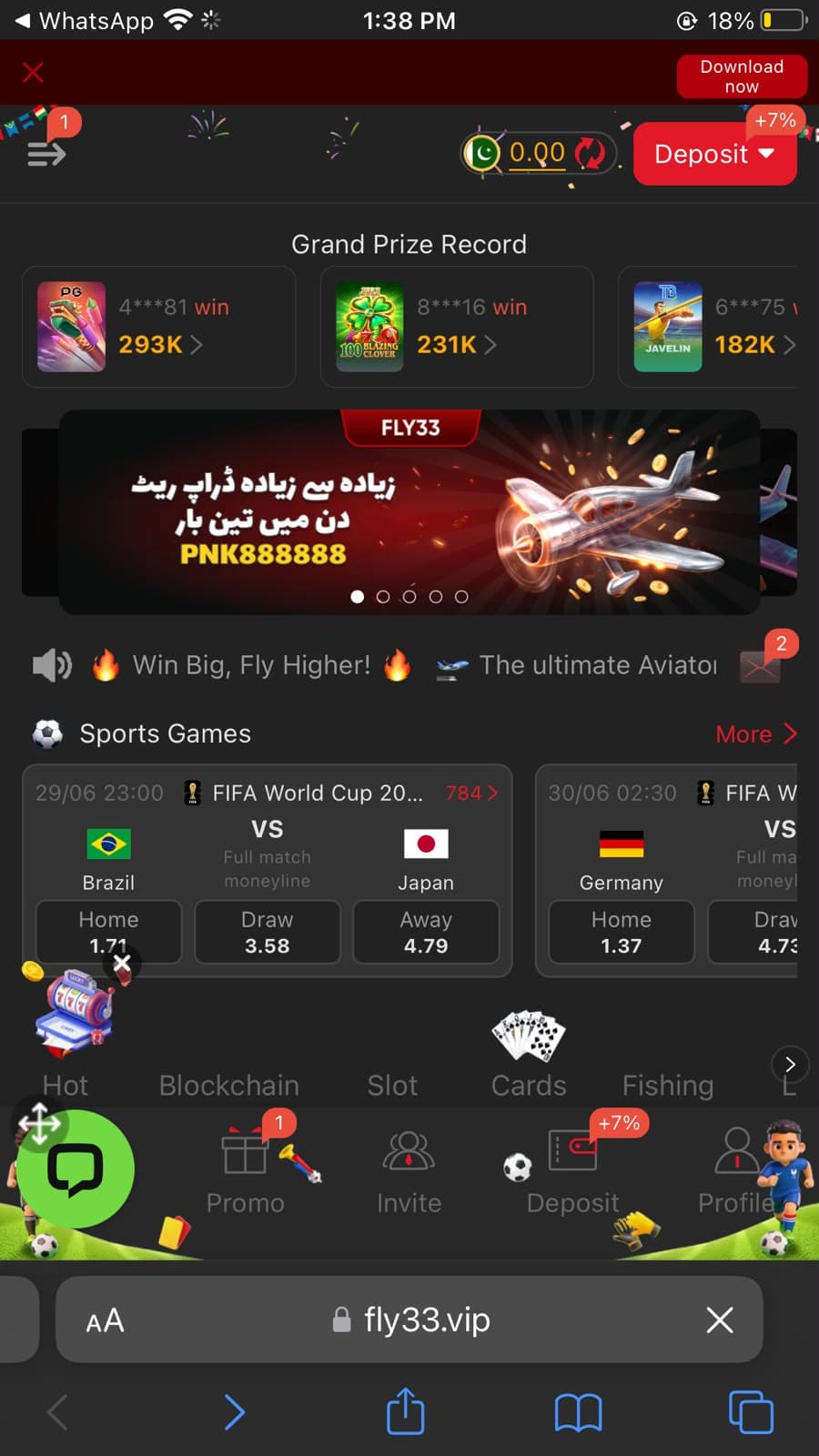
Testing was conducted on a mid-range Android smartphone running Android 13 over a stable WiFi connection, with additional observations over 4G mobile data. During evaluation, installation completed without errors in under one minute, the home screen loaded a full interface with Grand Prize Records, an Aviator-branded promotional banner, live FIFA sports markets, and a bottom navigation bar covering Promo, Invite, Deposit, and Profile sections. The deposit page confirmed JazzCash and EasyPaisa support from a minimum of Rs 100, with deposit bonuses ranging from +1% to +3.5% for JazzCash and +1% to +2% for EasyPaisa. Cryptocurrency deposits carried an additional +7% bonus.
The standard APK category caveats apply: Fly33 is not on the Google Play Store, developer identity is not publicly confirmed, and the source of any downloaded APK directly determines how safe the installation is. For users who understand APK installation and want a crash-game-focused Android platform with confirmed Pakistani payment method support, Fly33 presents a feature-rich option for 2026.
⚠️ Important: Fly33 is not available on the Google Play Store and its developer identity is not publicly verified. Downloading APK files from unverified sources carries inherent security risks. This review is for informational purposes only. Always download from sources you trust and review all permissions carefully before approving them.
Fly33 Quick Facts
| App Name | Fly33 Game |
|---|---|
| Category | Crash, Sports Betting & Slots |
| Platform | Android APK |
| File Size | Varies by version |
| Android Requirement | Android 7.0+ (recommended) |
| Developer | Not publicly verified |
| Play Store | Not listed |
| Min Deposit | Rs 100 (JazzCash / EasyPaisa) |
| Target Users | Android users in Pakistan |
Fly33 Review Ratings
| Category | Rating |
|---|---|
| Installation Process | 8/10 |
| Interface Design | 8/10 |
| Navigation Ease | 8/10 |
| Registration Flow | 7/10 |
| Login Experience | 7/10 |
| Performance Stability | 7/10 |
| Payment Options | 8/10 |
| Transparency | 5/10 |
| Overall Experience | 7/10 |
Ratings based on installation ease, interface design, navigation quality, registration flow, login experience, performance stability, payment options, and public developer transparency — compared with similar APK platforms reviewed on this site.
Fly33 APK Download
Fly33 is not available on the Google Play Store. The APK must be downloaded from a trusted source and installed manually on your Android device. Verifying the download source before proceeding is an essential step that directly affects the safety of the installation.
⚠️ APK Safety Warning: Downloading APK files outside the Google Play Store carries inherent security risks. Always scan downloaded files with antivirus software before installing, verify the source URL carefully, avoid modified or repackaged APK versions, and keep your Android device security patches up to date.
APK Download Safety Checklist
Download only from trusted and verified sources — confirm the URL matches fly33vip.com before saving the file to your device
Never install modified, cracked, or repackaged APK versions from unofficial channels or unverified Telegram groups
Scan the downloaded APK file with mobile antivirus software before starting installation
Review every permission request during installation — only approve permissions clearly required for normal app functionality
Keep your Android OS and monthly security patches updated before installing any third-party APK file
Use a unique password not shared with any banking, financial, or other sensitive online account
Step-by-Step Fly33 APK Installation Guide
Installing Fly33 requires a few additional steps compared to Play Store applications, but the process is straightforward for most compatible Android devices and typically completes in under five minutes when a reliable download source is used.
- 1
Step 1: Locate a Trusted Download Source
Before downloading, verify that the version number matches the latest available release. Avoid unofficial Telegram groups, third-party APK repositories, and unverified social media posts — these channels commonly distribute modified or outdated packages. Use the download link on this page to access the official Fly33 APK.
- 2
Step 2: Download the APK File
Tap the download button and wait for the file transfer to complete over a stable WiFi or 4G connection. The Fly33 APK downloads as a single file — no compressed archives or multi-part downloads were required during testing. Interrupted downloads may produce a corrupted file that fails to install.
- 3
Step 3: Open the Downloaded APK
Navigate to your Downloads folder using your file manager, then tap the Fly33 APK file to begin installation. Android will display a standard security notification because the application originates outside the Play Store — this warning is expected for all manually installed APK files and does not automatically indicate a problem.
- 4
Step 4: Enable Installation from Unknown Sources
If prompted, allow installation from unknown sources for the browser or file manager you used to download the file. On Android 8 and above, this is a per-app permission rather than a global setting — enable it specifically for the app used to download the APK and retry installation.
- 5
Step 5: Wait for Installation to Complete
Installation finished in under one minute on the test device. No additional resource downloads were requested before the first launch — the complete application was contained within the initial APK package. If installation stalls, check that you have at least 300 MB of free storage available.
- 6
Step 6: Launch the Application
Tap Open after installation completes. The home screen appeared with a Deposit button, Grand Prize Record section, sports betting markets, and bottom navigation tabs (Promo, Invite, Deposit, Profile). The initial load took slightly longer than subsequent launches while the app retrieved server content — this is normal behavior.
💡 Android 8+ note: On Android 8 and above, the "Install Unknown Apps" permission is browser or file manager-specific rather than a global switch. If installation is blocked after downloading, go to Settings → Apps → select the browser or file manager you used → enable "Install Unknown Apps" and retry.
Common Installation Problems & Solutions
Installation blocked by Android
Verify that Install from Unknown Sources is enabled for the specific browser or file manager you used. On Android 8+, this is a per-app permission. Find the correct app in Settings → Apps, enable Install Unknown Apps, and retry the installation.
APK will not open after download
The downloaded file may be incomplete or incompatible with your device. Download the APK again from a reliable source and confirm the version number matches your Android release before attempting installation again.
Insufficient storage error
Installation requires available device storage. Remove unused applications or clear large cached files to free space before retrying. Several hundred megabytes of free storage is typically needed for installation and initial data.
Parse error during installation
A parse error usually indicates the APK version is incompatible with your Android version. Obtain a version specifically designed for your Android release and try again from a clean download.
App content not loading after install
Fly33 requires a stable internet connection for initial content loading. If the app appears stuck on a loading screen, check your network connection, switch between WiFi and mobile data, and try reopening the application.
Fly33 Registration & Login Guide
Creating a new account is one of the first tasks after launching Fly33. The registration option is accessible directly from the home interface and follows a familiar mobile form layout — no external browser or separate sign-up website is required during the process.
- 1
Step 1: Open Fly33 & Navigate to Registration
Launch the app after successful installation. The registration option is accessible from the home interface. During testing, the registration screen loaded without delay and each form field accepted input correctly. The layout follows a familiar mobile form design.
- 2
Step 2: Enter Your Account Details
Fill in the required account information as prompted. Input fields accepted information smoothly during testing, and switching between text boxes felt responsive. Provide accurate details — the information entered here may affect verification and account recovery options later.
- 3
Step 3: Create a Secure Password
Create a strong password using a combination of uppercase letters, lowercase letters, and numbers. Avoid reusing a password from any banking or financial account to keep your Fly33 credentials separate and reduce risk if any single platform experiences a data issue.
- 4
Step 4: Confirm and Submit Your Registration
Review all entered details before submitting. Error messages appeared clearly whenever mandatory information remained incomplete during testing, making it easy to identify and correct missing fields. Completing registration using a stable internet connection avoids partial submission errors.
- 5
Step 5: Log In & Explore the App
After registration, log in using your new credentials. The login form contained clearly labeled fields and a visible sign-in button during testing. Authentication completed quickly over WiFi. If login takes longer than expected, switching to a stable WiFi connection typically improves consistency.
Login Experience & Session Notes
Login speed
The login screen loaded almost instantly during testing. Authentication completed quickly over a stable WiFi connection. If login appears to take longer than expected, switching from mobile data to a stable WiFi connection typically improves loading consistency.
Error message clarity
When incorrect credentials were entered intentionally, the application displayed a clear error notification rather than remaining on a loading screen. This made it straightforward to identify whether the issue was connectivity or incorrect account details.
Cache and session behavior
Clearing the application cache after installing a newer APK version can resolve occasional login or loading delays without requiring a complete reinstall. This is a useful first troubleshooting step before considering a full reinstallation.
Content loading after sign-in
The home screen after login displays Grand Prize Records, promotional banners, and sports markets that depend on live server content. These sections occasionally required additional loading time on slower connections before fully rendering.
⚠️ Registration accuracy matters: The details you provide during registration may affect account verification and access to deposit and withdrawal features. Double-check all information before submitting. Correcting mistakes after account creation may require contacting LiveChat support.
Common Login Problems & Solutions
Incorrect account credentials
Verify your username and password carefully. If you are unsure of your password, use the password recovery option accessible from the login screen before attempting multiple failed logins.
Network interruption during login
Temporary network interruptions can cause login screens to time out or show loading indicators. Switch to a more stable connection and try again. WiFi generally produces more consistent authentication than variable mobile data signal.
Cache conflicts after APK update
After installing a newer APK version, clearing the app cache via Settings → Apps → Fly33 → Clear Cache before logging in can resolve minor authentication inconsistencies without requiring a full reinstall.
Server maintenance period
During server maintenance windows, login functionality may be temporarily unavailable. If repeated attempts fail across different network connections, wait a short period and try again before escalating to LiveChat support.
Fly33 App Features & Interface
The following observations examine how individual features and interface elements contribute to everyday usability — based on hands-on testing rather than promotional descriptions. The focus is on what was actually observed during navigation rather than what the app claims to offer.
Aviator Crash Game
The home screen ticker displayed "Win Big, Fly Higher! The ultimate Aviator" — indicating an Aviator-style crash game is featured prominently. Crash games require players to cash out before the multiplier crashes. The airplane branding of Fly33 directly references this game type.
Sports Betting Markets
The home screen showed live FIFA World Cup markets during testing, with match odds displayed for Brazil vs Japan and Germany vs another team. The Sports Games section is accessible from the main interface with a "More" link for expanded markets.
Slots, Fishing & Card Games
Bottom navigation tabs during testing included Hot, Blockchain, Slot, Cards, and Fishing categories, indicating a multi-provider game library. The Grand Prize Record section displayed recent large wins from PG Soft and other providers, confirming multiple slot providers are active.
JazzCash & EasyPaisa Deposits
The deposit screen confirmed both PKR-JazzCash (+1–3.5% bonus) and PKR-EasyPaisa (+1–2% bonus) as supported payment methods. Minimum deposit is Rs 100 with a maximum of Rs 500,000. Cryptocurrency deposits carry an additional +7% bonus, offering a higher incentive for crypto-using players.
Referral & Invite Commission
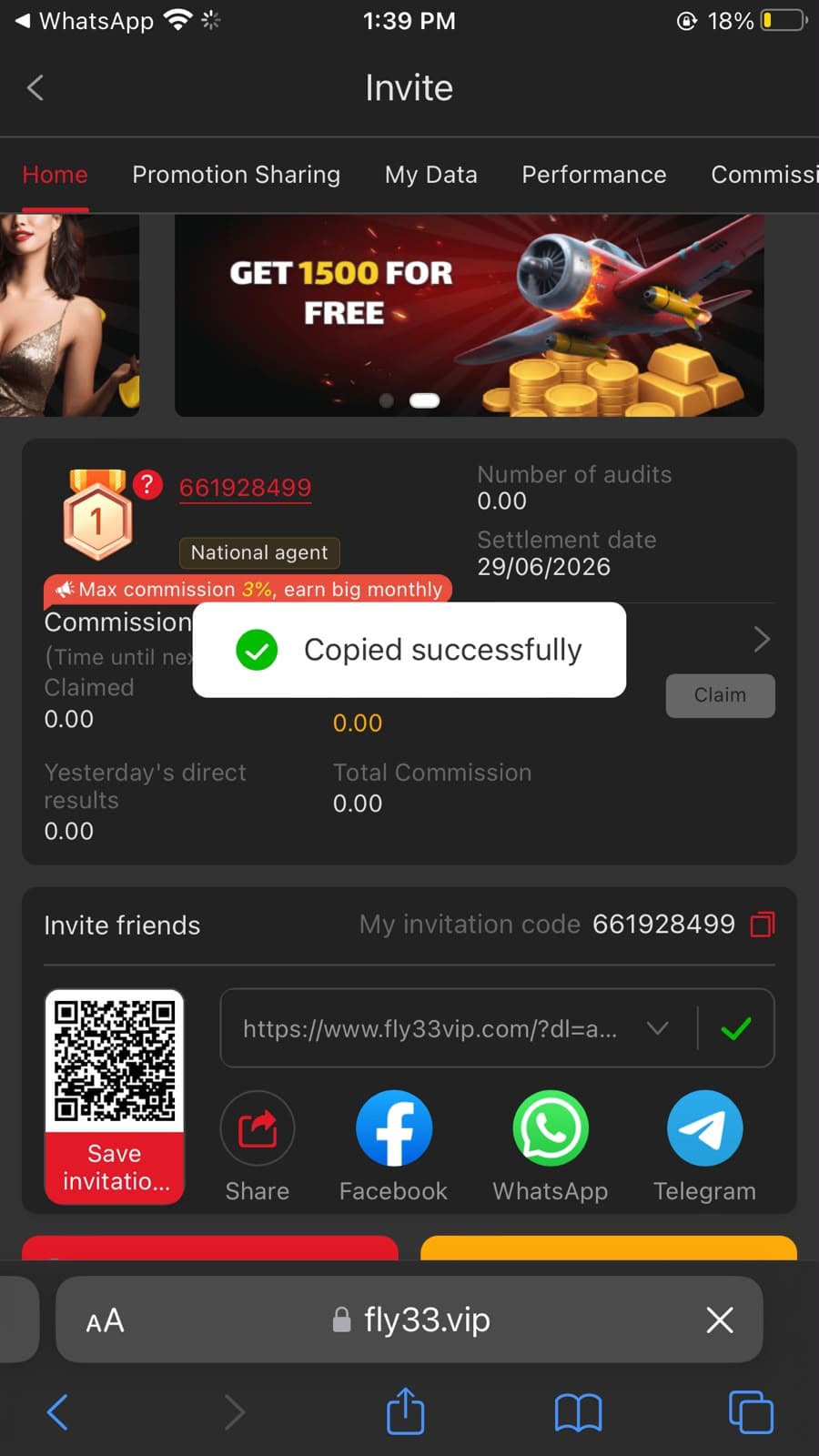
The Invite section showed a "GET 1500 FOR FREE" banner and a National Agent commission rate of up to 3%. Each user receives a unique QR code and shareable invitation link for WhatsApp, Facebook, and Telegram. Settlement dates are displayed alongside commission tracking metrics.
LiveChat Customer Support
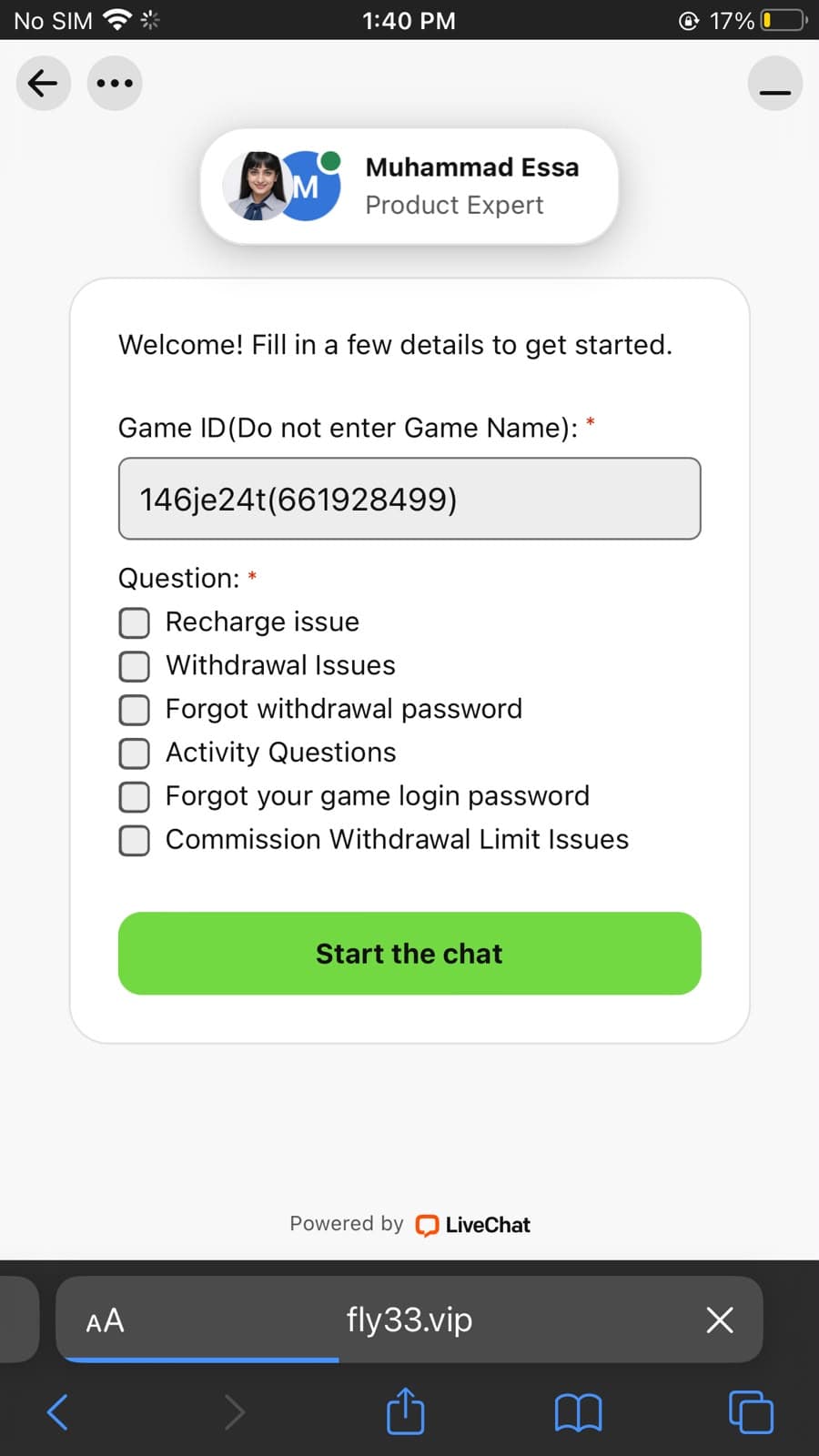
A LiveChat support widget was available during testing, connecting users to a Product Expert. The support form allows users to submit their Game ID and select a query category — covering Recharge Issues, Withdrawal Issues, Forgot Withdrawal Password, Activity Questions, and Commission Withdrawal Limit Issues.
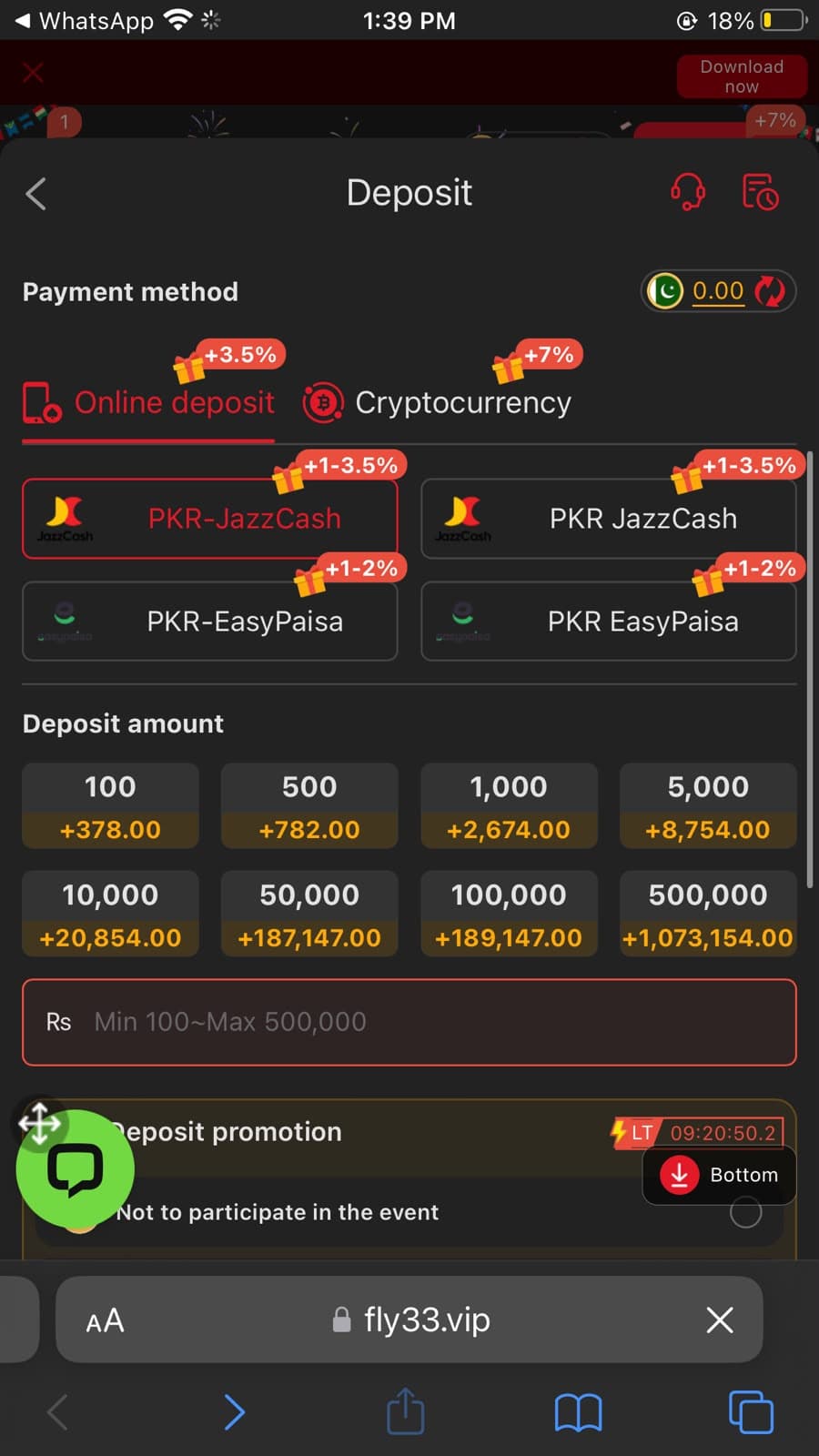
Deposit Options Confirmed During Testing
| Payment Method | Deposit Bonus | Min / Max |
|---|---|---|
| PKR-JazzCash | +1% to +3.5% | Rs 100 – Rs 500,000 |
| PKR-EasyPaisa | +1% to +2% | Rs 100 – Rs 500,000 |
| Cryptocurrency | +7% | Varies by crypto |
Device Compatibility Requirements
| Minimum Android Version | Android 7.0 or newer (recommended) |
|---|---|
| Recommended RAM | At least 3 GB for smooth multitasking |
| Internet Connection | Stable connection required for live sports and crash content |
| Storage Required | Several hundred MB of available storage |
| Best Connection Type | WiFi produces faster, more consistent page loading |
| Higher Specifications | Better hardware improves Aviator crash game responsiveness |
💡 Practical tip: Crash games like Aviator depend on a low-latency internet connection — a brief network drop at the wrong moment can interrupt an active round. Playing over WiFi rather than fluctuating mobile data significantly reduces this risk and produces more consistent session experiences.
Real Testing Experience
The most useful way to evaluate any APK is by looking beyond promotional screenshots and marketing descriptions. Fly33 was tested on a mid-range Android smartphone running Android 13 over a stable WiFi connection, with additional observations on standard 4G mobile data. The aim was to see how the application actually behaves during normal use rather than evaluating best-case promotional claims.
The APK package downloaded without interruption as a single file from the referral link. Android displayed its standard security warning before installation began — this is expected behavior for any application installed outside the Play Store and does not automatically indicate the file is problematic. Installation completed in under one minute without requesting additional downloads after the initial package finished. The entire setup process from download to first launch took less than five minutes.
The home screen after the first launch presented more content than expected for an initial load. The Grand Prize Record section displayed recent large wins from PG Soft and other providers, confirming that multiple slot providers are active within the platform. A prominent promotional banner carrying the FLY33 branding and Urdu marketing text appeared below this section, alongside an Aviator promotional strip reading "Win Big, Fly Higher! The ultimate Aviator." The sports section below showed live FIFA World Cup odds for two matches within scrolling distance of the home screen.
Moving between sections felt intuitive throughout the testing session. The bottom navigation bar — Promo, Invite, Deposit, and Profile — remained persistent and responsive across all screens. Touch responses registered accurately and the Deposit screen opened immediately when tapped, displaying JazzCash, EasyPaisa, and Cryptocurrency tabs without any loading delay.
The Invite section opened a full commission dashboard showing the National Agent level badge, a settlement date, and commission tracking metrics. The "GET 1500 FOR FREE" banner was visible at the top, and the invitation code with QR code and social sharing buttons (WhatsApp, Facebook, Telegram) appeared in the lower half of the screen. Commission rates of up to 3% were displayed with a "Max commission 3%, earn big monthly" tag alongside the agent level indicator.
APK Download
Completed without interruption — single file, no additional archives required
Installation Time
Under one minute on test device; standard unknown-source Android prompt shown
First Launch Speed
Slightly longer than subsequent sessions — normal for content-rich server-loaded interface
Home Screen Content
Grand Prize Record, Aviator banner, live sports betting, and full game navigation loaded
Deposit Screen
JazzCash (+1–3.5%), EasyPaisa (+1–2%), Crypto (+7%) confirmed — min Rs 100 displayed
Invite / Referral
3% max commission, Rs 1,500 bonus banner, QR code sharing observed
Live Support
LiveChat widget present — connects to Product Expert with categorized query form
Navigation Smoothness
Responsive throughout on both WiFi and 4G — bottom navigation bar consistent
Crashes / Freezes
None observed during approximately thirty minutes of continuous testing
Device Temperature
Only slightly warm after extended activity — within the expected normal range
Honest Review: Pros & Cons of Fly33
What Works Well
- JazzCash and EasyPaisa deposits confirmed with bonus percentages — minimum deposit Rs 100
- Aviator crash game prominently featured — a popular choice among Pakistani players
- Sports betting including live FIFA World Cup markets observed during testing
- Referral commission up to 3% for National Agent level with QR code sharing
- Cryptocurrency deposits accepted with an additional +7% bonus incentive
- LiveChat support available directly within the app via Product Expert
- Simple APK installation process that completes in under one minute on most devices
- Multiple game categories: Blockchain, Slots, Cards, Fishing, and Sports all accessible
What to Consider
- Not available on the Google Play Store — manual APK side-loading required
- Developer identity is not publicly verified or independently confirmed
- Manual updates require finding and downloading newer APK versions independently
- Performance and loading speed depend heavily on internet connection quality
- APK installation requires enabling unknown source permission on Android
- Limited publicly available information regarding data collection and privacy practices
- Financial and gambling-style features carry inherent risk — use responsibly
- Some sections reloaded after returning from extended idle periods during testing
Who May Find It Useful
- Adults comfortable installing and managing APKs manually on Android
- Pakistani users who prefer JazzCash and EasyPaisa for deposits
- Players specifically interested in Aviator crash-style games
- Users who want to earn referral commission through an invite system
- Android owners running Android 7.0 or newer with stable internet access
Who Should Avoid It
- Users who only install applications from the Google Play Store
- Anyone uncomfortable with the risks of manual APK side-loading
- Users with consistently unstable internet — crash games require low latency
- Those with limited storage space or older Android devices below 7.0
- Users who require verified developer identity or confirmed regulatory licensing
Practical Usage Tips
Download only the newest available APK version — never install outdated files that may have unresolved compatibility issues
Use JazzCash for the highest deposit bonus — the +1–3.5% range observed was higher than EasyPaisa on equivalent deposit amounts
For Aviator crash games, use WiFi rather than mobile data — network drops mid-round can interrupt active play sessions
Share your referral QR code via WhatsApp or Telegram to accumulate commission — the 3% National Agent rate applies to referred player activity
Review all granted permissions through Android Settings → Apps → Fly33 → Permissions periodically to confirm no unexpected access is active
Keep your Android OS updated — newer APK versions may require updated Android security patches for compatible installation
Safety, Trust & Risk Analysis
Installing any APK from outside the official Google Play Store requires additional attention that would not be necessary for a marketplace-verified application. While Fly33 can be installed successfully on compatible Android devices and its deposit screen confirms functional JazzCash and EasyPaisa integration, the following risk factors and positive observations are drawn from hands-on testing rather than promotional material.
Permissions Observed During Testing
During testing, the application requested permissions commonly associated with Android apps, which may include storage access for downloading files and media content. Before accepting any permission, users should consider whether it is necessary for the feature they intend to use.
If a permission appears unrelated to gaming or deposit functionality — such as access to contacts, SMS messages, or real-time location data — reviewing or denying it is appropriate. Android allows users to revoke individual permissions at any time through Settings → Apps → Fly33 → Permissions without needing to uninstall the application.
Key Risk Factors
APK modification risk — sources other than the official download may distribute repackaged versions that contain harmful modifications
Developer identity is not publicly verified — data handling and privacy practices have limited external transparency or independent auditing
No Google Play Store listing means no automated malware scanning, no security review history, and no verified update record
Financial transactions and gambling-style games carry inherent risk — verify all deposit details before confirming and never deposit more than you can afford to lose
No confirmed Pakistani regulatory license — legal recourse in the event of disputes may be limited or unavailable
Review all permissions at installation time — avoid granting unnecessary access to contacts, SMS messages, or real-time location data
Positive Trust Signals Observed
Several positive signals were noted during the evaluation. The APK installed without requesting unexpected secondary downloads — the complete application was contained in the initial package. The deposit screen displayed functioning JazzCash and EasyPaisa options with transparent bonus percentages and deposit limits, which is a concrete usability indicator rather than a promotional claim. The Invite section showed a functioning commission dashboard with a real settlement date (29/06/2026), commission tracking metrics, and a working QR code — confirming the referral system is active rather than decorative.
The LiveChat support widget connected to a named Product Expert (Muhammad Essa) with a structured query form that listed specific support categories including Recharge Issues, Withdrawal Issues, and Commission Withdrawal Limit Issues — indicating a functional support infrastructure rather than a placeholder. These observations improve confidence in day-to-day usability but should not be interpreted as a guarantee of complete security in the absence of independent third-party verification.
For users who want to compare Fly33 with other reviewed platforms, the GGX77 Game review covers a multi-provider platform with JILI slots and 3% cashback. The PKPlus review covers a beginner-friendly Android platform with a clean interface.
Privacy Considerations
Public information regarding Fly33 data collection practices is limited. Users should avoid storing unnecessary personal information inside the application wherever possible. Using a strong password that is different from passwords used on banking or financial accounts is a sensible baseline security practice regardless of which platform is being used.
⚠️ Disclaimer: This review is for informational purposes only and does not constitute financial, legal, or security advice. Users install Fly33 entirely at their own risk. Always download from sources you trust, review all permission requests carefully, and exercise standard caution before sharing any personal or financial information inside any APK-based application.
Frequently Asked Questions
Is Fly33 Game safe to install on Android?
Safety depends largely on where the APK is downloaded. Using a trusted source and carefully reviewing all application permissions before installation reduces potential risks. Scan the downloaded APK with antivirus software before installing and avoid unofficial Telegram groups or unverified third-party APK repositories.
Does Fly33 support JazzCash and EasyPaisa?
Yes. The deposit screen observed during testing confirmed both PKR-JazzCash (with +1–3.5% deposit bonus) and PKR-EasyPaisa (with +1–2% deposit bonus) as active payment methods. Minimum deposit shown was Rs 100 with a maximum of Rs 500,000. Cryptocurrency deposits are also listed at +7% bonus.
What is the Fly33 referral commission rate?
The Invite section showed a maximum commission of 3% at National Agent level. A "GET 1500 FOR FREE" promotional banner was also displayed. Referrals are tracked through a unique QR code and shareable invitation link compatible with WhatsApp, Facebook, and Telegram.
How do I install the Fly33 APK on Android?
Download the APK from a trusted source, enable Install from Unknown Sources in Android Settings (browser or file manager-specific on Android 8+), locate the file in your Downloads folder, tap to install, and launch the app. Most Android 7.0+ devices complete the process in under five minutes.
What games does Fly33 offer?
Based on testing, Fly33 features an Aviator crash game, live sports betting (including FIFA World Cup markets), Blockchain games, Slot games, Card games, and Fishing games accessible from the bottom navigation bar. The Grand Prize Record section confirms active large-win payouts.
Does Fly33 work on older Android phones?
Many versions are expected to support Android 7.0 and newer. Performance on older or lower-end hardware may be slower. Users with entry-level smartphones may experience slower loading times, particularly when multiple applications remain open simultaneously or on weaker internet connections.
Can installation problems occur with Fly33 APK?
Yes. Common issues include insufficient storage space, incompatible Android versions, incomplete APK downloads, or disabled unknown-source permission. Freeing storage space, verifying the APK version matches your Android release, and enabling the unknown-source permission for your download browser typically resolves most problems.
Final Verdict
Fly33 offers a feature-dense Android application experience for users in Pakistan who are comfortable managing APKs manually and want access to Aviator crash, live sports betting, and a multi-category game library from a single interface. During hands-on testing, the application delivered a stable installation, a content-rich home screen on first launch, and a deposit page that confirmed JazzCash and EasyPaisa support with transparent bonus percentages starting from a minimum of Rs 100.
The platform stands out within the APK review category for the depth of its deposit transparency — showing exact bonus rates (+1–3.5% JazzCash, +1–2% EasyPaisa, +7% Crypto) and deposit amounts directly on the deposit screen without requiring login to view them during testing. The referral system similarly displayed functional commission tracking and settlement dates rather than generic promotional text. These details represent a higher level of practical transparency than many comparable APK platforms reviewed on this site.
The most significant limitations are characteristics shared across the APK category: no Google Play Store listing means no automated security scanning, developer identity is not publicly confirmed, and manual update management places more responsibility on the user than a traditional marketplace installation would. The gambling and crash game nature of the platform introduces additional risk considerations that users should weigh carefully before depositing.
For users searching for Fly33 Game or Fly33 APK download, this platform provides a functional Android experience when downloaded from a trustworthy source. Before installing, verify the APK version, review all requested permissions carefully, and keep realistic expectations around manual update management and publicly limited developer information. For a broader comparison of all reviewed platforms on this site, visit our earning apps guide.
Ready to try Fly33? Use the official download link below.
Download Fly33 APKAlways install from a trusted source. Review all permissions carefully before approving.